After a long trail of unfinished projects (which I will hopefully write about later), I've finally managed to choose an idea simple enough to build in an evening. It's a Chrome extension.
The problem
As many other engineers do, I like to tinker with cars; my poison of choice in this matter is (relatively) cheap BMWs. When it comes to ordering replacement parts, a very popular website is RealOEM, who host comprehensive catalogues for BMW models complete with annotated diagrams and part numbers.
Generally, when ordering parts, my workflow looks like this:
- check the relevant part diagram on RealOEM
- pick out the parts I need (or want)
- one by one, copy the part numbers
- paste them into the vendor's website I want to buy them from.
This can get even more complicated when we consider:
- Being in Australia, shipping is often very expensive, and costs vary wildly between different carriers
- Multiple vendors exist, often with very different prices
- Some parts will only be available at certain vendors
- OE/OEM/aftermarket alternatives to the BMW-supplied genuine parts exist, with further varying pricing, quality, and availability
Even without considering the can of worms the above considerations open up, I've spent far too many dull hours copy-pasting part numbers between browser tabs. So why not automate the process?
Concept
The simplest possible implementation should look something like this:
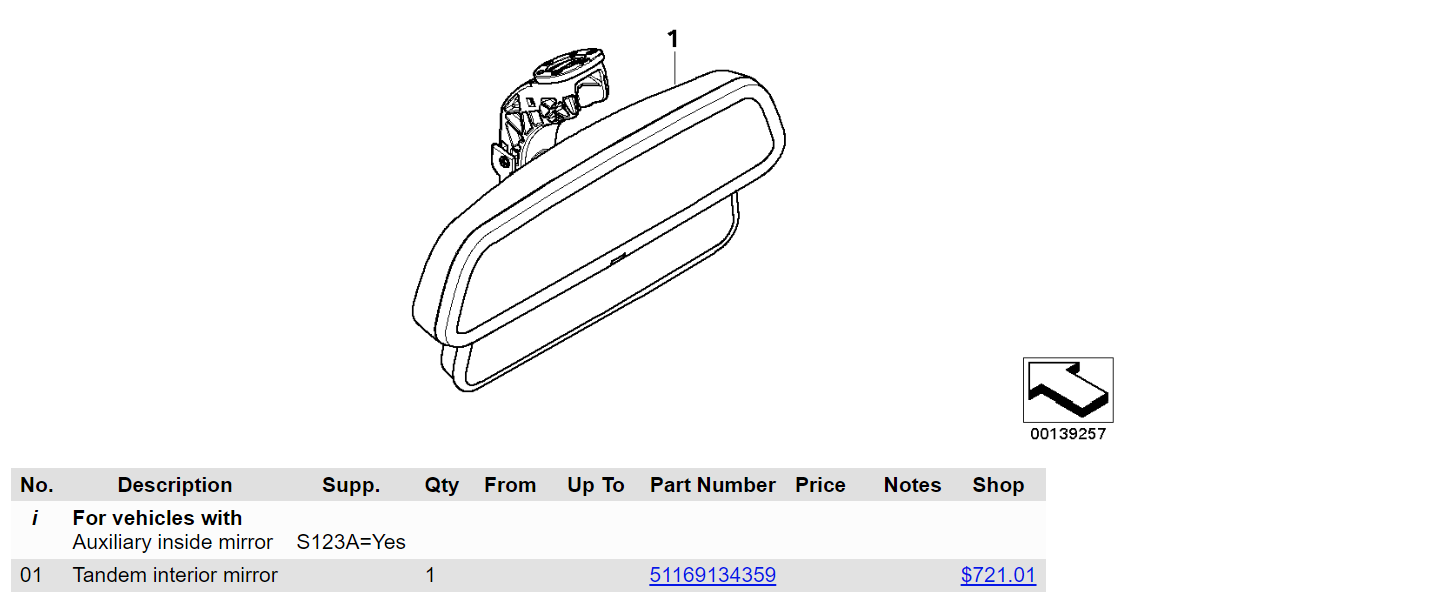
Just as an aside, I really like RealOEM's UI; there's no flashy styling or animations, but it displays all the information in a compact, readable format, and even highlights cross-references between the table and diagram by clicking a part on either. The only real improvement I think it could use is a way to filter by option codes (i.e. "S123A" on the above screenshot).
Even by adding a single extra column with an up-to-date price and a store link, this would save heaps of time - after finding the desired part on the diagram, a price-check which involves:
- Copy part number
- Open the vendor website in a new tab
- Paste part number in the search box
- Find the matching part in results and view the price
can be shortened to:
- Wait for the shop link to load
- Read the price from the table
I can do the first set of steps in under 5 seconds, but the difference between 5 seconds of busywork and <0.5 seconds of nothing feels absolutely immense.
Why a Chrome extension?
Well, more generically, a browser extension, but I figured a Chrome extension would be easier to figure out given how popular it is.
It seemed like the obvious choice. Our implementation needs to:
- Extract a list of part numbers we want to look up
- For each part, make a search request to our vendor's website
- Parse the search results, extracting the matching part's price and store link
- Display the price and store link next to the original part number
This looks pretty easy, right? Here's what we need for each step:
- Parse page DOM
- Make a HTTP request
- Parse response HTML (unfortunately, there's no nice search API for this vendor)
- Manipulate page DOM
These are all things a web browser excels at, so I decided to get right into it and start building.
Implementation
Chrome extensions provide an interface for content scripts to read and modify webpages. With this, we can easily check off steps 1 and 4!
DOM manipulation
- Parse page DOM
function getTableRows() {
  return document.querySelectorAll("#partsList > tbody > tr:not(:first-child)");
}

function getPartNumber(tableRow) {
  const partAnchor = tableRow.querySelector(
    ':scope > td > a[href^="/bmw/enUS/part?"]',
  );
  if (partAnchor) {
    return partAnchor.textContent;
  } else {
    return null;
  }
}
Example usage:
for (const row of getTableRows()) {
  console.log(getPartNumber(row));
}
> 51169134359Query selectors are great.
- Manipulate page DOM
function extendTableRows() {
  let partRows = [];
  getTableRows().forEach((tableRow) => {
    const cellNode = document.createElement("td");
    tableRow.appendChild(cellNode);

    if ((partNumber = getPartNumber(tableRow))) {
      partRows.push({
        partNumber,
        infoCell: cellNode,
      });
    }
  });
  return partRows;
}
Even easier.
To get this to run, we put it in a file at /scripts/content.js and refer to it
in our extension's manifest:
{
  "manifest_version": 3,
  "name": "RealOEM Price Helper",
  "version": "0.1",
  "description": "Add current prices to part numbers on RealOEM",
  "content_scripts": [
    {
      "matches": ["https://www.realoem.com/bmw/enUS/showparts*"],
      "js": ["/scripts/content.js"],
      "run_at": "document_end"
    }
  ]
}
This causes our content script to be run whenever a RealOEM parts page finishes loading.
Fetching data
Now, for the filling in our DOM sandwich: steps 2 and 3 to fetch our data. This
should be easy, right? All we need to do is use fetch() to load the search
results, then use a DOMParser to extract the relevant information. Something
like this:
async function fetchPrice(partNumber) {
    const response = await fetch(`https://cars245.com/en/catalog/?q=${partNumber}`);
    const responseText = await response.text();

    const parser = new DOMParser();
    const doc = parser.parseFromString(responseText, "text/html");
    const anchorElement = doc.querySelector(
      'a[data-js-click-event="clickProductCard"]'
    );
    ...
}
We can run this in the console and it almost works, but there's a catch:
Access to fetch at 'https://cars245.com/en/catalog/?q=51169134359' from origin 'https://www.realoem.com' has been blocked by CORS policy: No 'Access-Control-Allow-Origin' header is present on the requested resource. If an opaque response serves your needs, set the request's mode to 'no-cors' to fetch the resource with CORS disabled.
I searched high and low, but there doesn't seem to be a way to circumvent this when making cross-origin requests from an extension's content script. So what's the solution?
Background service worker
Indeed, Chrome disallows content scripts from making cross-origin requests. The suggested solution is to make cross-origin requests from a service worker on the content script's behalf, using message passing to transfer requests and responses back and forth. Adding this to our manifest is simple enough:
{
  ...
  "background": {
    "service_worker": "/scripts/service_worker.js",
    "type": "module"
  },
  "host_permissions": ["https://cars245.com/*"],
}
Excluding the fetchPrice method, our service worker script is fairly short:
chrome.runtime.onMessage.addListener((request, sender, sendResponse) => {
  const { type, target, data } = request;
  if (target !== "background") {
    return false;
  }
  switch (type) {
    case "fetch-price":
      fetchPrice(data.partNumber, sendResponse); // async, calls sendResponse() when it's done
      break;
    default:
      console.warn(`Unknown message type for service_worker: "${type}"`);
      sendResponse({ success: false });
  }
  return true; // keeps connection open for async sendResponse() usage
});
There is a serious gotcha here which had me stumped for a good while: the
handler function absolutely cannot be async, as async functions always return
a Promise, even if nothing is being awaited, and Chrome special-cases the
true return value for keeping the connection open - when the true is wrapped
in a Promise, it's treated as if the handler just returned some nonsense, and
the requester on the other end (in this case, the content script) is immediately
replied to with undefined, instead of with our price data.
The data structure for our request contains:
target: designates the listener we want it to go totype: allows us to offer multiple task types per listener. For example, later, we may want to offerfetch-shipping-costalongsidefetch-price.data: whatever data the task calls for. In this case, it's an object with propertypartNumber.
Now for fetchPrice. It can near-identical to our
function from earlier:
async function fetchPrice(partNumber, sendResponse) {
    const response = await fetch(`https://cars245.com/en/catalog/?q=${partNumber}`);
    const responseText = await response.text();

    const parser = new DOMParser();
    const doc = parser.parseFromString(responseText, "text/html");
    const partInfo = ...  // shortened for clarity; assume we're extracting it from doc
    sendResponse(partInfo);
}
Aaaand, all done, right?
Nope:
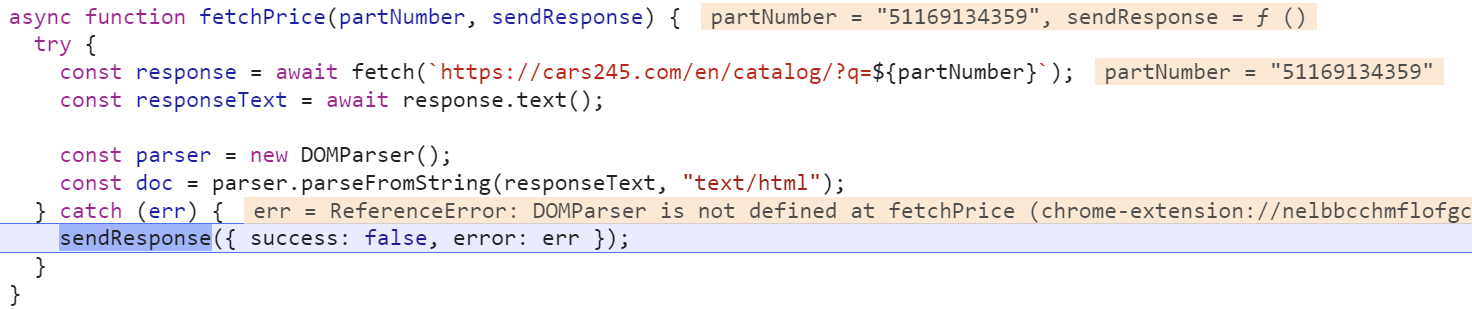
Turns out that service workers operate in a sort of lightweight, stripped-down environment where DOMParser isn't available. So how do we parse the HTML search results?
At this point, there are a couple of options:
- Include some giant package for parsing the HTML without a DOM
- Pass the HTML along to another service running in an offscreen document, which has access to DOMParser
Both of these options kind of suck. To include a HTML parsing library I'd have to go back to square one and rebuild the extension on a framework with Webpack/Vite, along with all the extra effort that comes with learning a new framework. Creating yet another service running in yet another document also sounds painful... but the Chrome docs recommend it! Surely it won't be too hard?
Descent into madness
OK, time to add our offscreen document to the manifest.
{
  ...
  "permissions": ["offscreen"]
}
<!-- offscreen/offscreen.html -->
<!DOCTYPE html>
<script src="offscreen.js"></script>// offscreen/offscreen.js
chrome.runtime.onMessage.addListener((message) => {
// Return early if this message isn't meant for the offscreen document.
if (message.target !== "offscreen") {
return;
}
// Dispatch the message to an appropriate handler.
switch (message.type) {
case "parse-request":
sendParseResult(handleParseRequest(message.data));
return;
default:
console.warn(`Unexpected message type received: '${message.type}'.`);
return;
}
});
function sendParseResult(data) {
chrome.runtime.sendMessage({
type: "parse-result",
target: "background-parser",
data,
});
}
function handleParseRequest(request) {
const {
id,
request: { provider, data },
} = request;
switch (provider) {
case "cars245":
return {
id,
result: parseSearchResultCars245(data),
};
default:
throw Error('Unknown search provider "${provider}"');
}
}We now have an offscreen document, offscreen.html, which registers its own
message listener. This service will use DOMParser to parse our search result
HTML, returning relevant part information.
You may have noticed the "background-parser" target in sendParseResult. I'm
not sure if it's possible to return results asynchronously via sendResponse()
as was done in the first service, but this is how the docs example did it, so I
stuck with it.
How do we interact with this offscreen document?
// lib/offscreen_parser.js

const OFFSCREEN_DOCUMENT_PATH = "/offscreen/offscreen.html";
const parseRequests = new Map();

export default function parseSearchResult(provider, htmlText) {
  const requestData = {
    id: crypto.randomUUID(),
    request: {
      provider,
      data: htmlText,
    },
  };
  return new Promise((resolve, reject) => {
    // Store the resolve function in the promises map, so it can be resolved upon response arriving
    parseRequests.set(requestData.id, resolve);
    sendMessageToOffscreenDocument("parse-request", requestData);
  });
}
We now have an offscreen_parser library to handle parsing via the offscreen
document, which can be imported from service_worker.js.
Each request is assigned a UUID, which is retained in the response. The
resolve method of each Promise returned by parseSearchResult is stored in
a Map, so that it can be resolved asynchronously when its matching response
arrives... we'll get to this later.
Of course, we now need to manage the lifecycle of this offscreen document. Extensions are only allowed to have one offscreen document at a time, so each time we dispatch a parse request, we need to ensure that one, and only one, copy of the offscreen document is currently running:
async function sendMessageToOffscreenDocument(type, data) {
  // Create an offscreen document if one doesn't exist yet
  if (!(await hasDocument())) {
    await chrome.offscreen.createDocument({
      url: OFFSCREEN_DOCUMENT_PATH,
      reasons: [chrome.offscreen.Reason.DOM_PARSER],
      justification: "Parse DOM for search results",
    });
  }
  // Now that we have an offscreen document, we can dispatch the message.
  chrome.runtime.sendMessage(buildMsg("offscreen", type, data));
}

async function hasDocument() {
  // Check all windows controlled by the service worker if one of them is the offscreen document
  const offscreenDocPathTail = OFFSCREEN_DOCUMENT_PATH.split("/").pop();
  const matchedClients = await clients.matchAll();
  for (const client of matchedClients) {
    if (client.url.endsWith(offscreenDocPathTail)) {
      return true;
    }
  }
  return false;
}
Finally, we need to handle each response returning from the offscreen document:
chrome.runtime.onMessage.addListener((message) => {
  if (message.target !== "background-parser") {
    return;
  }

  // Dispatch the message to an appropriate handler.
  switch (message.type) {
    case "parse-result":
      const data = message.data;
      handleSearchResultsParseResult(data.id, data.result);
      closeOffscreenDocument();
      break;
    default:
      console.warn(`Unexpected message type received: '${message.type}'.`);
  }
});

async function handleSearchResultsParseResult(id, result) {
  const resolve = parseRequests.get(id);
  if (resolve) {
    await resolve(result);
    parseRequests.delete(id);
  }
}

async function closeOffscreenDocument() {
  if (!(await hasDocument())) {
    return;
  }
  await chrome.offscreen.closeDocument();
}
Upon receiving a response, the corresponding Promise stored in the
parseRequests Map is resolved, passing the response data back up to the
service worker handler, which in turn sends it to the content script in a
response.
Okay, this time, that actually is all - the extension, implemented in this way, does (mostly) work. There are issues with some requests not returning, I suspect due to the liberal use of async combined with a complete lack of locking around the single offscreen parser.
Full source code here if you'd like to take a closer look.
More gotchas
I ran into a bunch of pain points. The Chrome documentation seems pretty sparse and doesn't provide much warning for a lot of these:
- There's no concept of channels or subscriptions for the message listeners, so
all the listeners end up receiving all messages, and it's up to you to filter
them in the listener. On top of this, if receiving responses sent via
sendResponse, the first response sent will be the only response received. - There's no sane way to share code between the content script, service worker, and offscreen document - the service worker can use ES6-style module imports, but the content script and offscreen script run in a browser environment and cannot.
- This one isn't really a Chrome problem, but with all the different messages going in different directions, I lost track of which format should be returned from what function, or sent in requests/responses. I mitigated this a little by using common functions to pack message objects wherever possible, but even with this, had instances of incorrectly wrapping a message type in the data field of a message type! This was all quite difficult to debug due to having to jump between the three separate JS environments.
In hindsight
This ended up being way, way harder than I expected it to be.
How did we get from four simple steps to dozens of functions, code running in three separate places with three sets of message passing, and over 300 lines of code?
I'd never written a browser extension before, so I wasn't too sure what to expect; the problem really was so simple, and it seemed like a common use case for a Chrome extension, so I assumed (wrongly) that it'd be easy to implement.
In hindsight, using an offscreen document for parsing HTML responses was not the right choice - it resulted in a massive increase in complexity that can't easily be abstracted away, mainly due to the limitation of a single, non-persistent offscreen instance.
I hope you learned something from my mistakes here! Perhaps it's time for me to go back and rewrite this without the mess that is the offscreen document.